
Planning a Drupal 7 to Drupal 11 Migration: A Business Guide.
Plan your Drupal 7 migration with MPACER. Our AI-assisted, human-reviewed approach helps accelerate delivery, improve precision and reduce repetitive work to support cost savings.

Your Drupal 7 website holds more than content. It carries customer journeys, search visibility and business processes built over years. A move to Drupal 11 must protect that investment while creating room to improve. At MPACER, we start with the decisions that shape a successful migration: what to preserve, what to improve and what to leave behind. This guide explains how to make those decisions, understand the cost drivers and plan a launch your business is ready for.
Why organisations should plan their move
Drupal 7 reached end of life on 5 January 2025. Drupal.org no longer provides community support or new Drupal 7 releases, and the Drupal Security Team no longer provides support or security advisories for Drupal 7 and compatible contributed projects.
Owners must make an explicit decision about security support and operational risk. Commercial extended support, available through providers identified by the Drupal Association, can provide breathing room while migration is planned. Assess its scope and terms.
Understanding the Migration Scope
Drupal’s official documentation explains that modern Drupal stores content and configuration differently from Drupal 7. Moving to Drupal 11 therefore involves preparing a new site and transferring the required information into it, rather than applying a normal version update to the existing installation.
Content can often be transferred using migration tools, but that does not automatically recreate the complete website. The theme must be rebuilt, and some modules need replacements or custom migration work. Business rules and custom features need individual review. A clear migration scope identifies what will transfer, what must be rebuilt and which dependencies need investigation.
Assess the whole service
Build an inventory for joint business and technical review:
- Content: Identify pages, documents, images, translations, user accounts and relationships between records. Check ownership, accuracy, duplicates, private files and important web addresses.
- Modules: Record enabled extensions and the business purpose of each. Confirm Drupal 11 compatibility and migration support; do not assume an equivalent name means an automatic transfer.
- Integrations: List connections to customer management, payments, email, search, sign-in and other services. Identify owners, access requirements and test arrangements.
- Custom functionality: Document calculations, forms, reports and permissions. Capture expected behaviour through examples, including exceptions staff handle manually.
- Hosting: Check the selected Drupal 11 release’s server, database and PHP requirements. Include backups, monitoring, deployment access and separate testing environments.
- Editorial workflows: Observe how people create, approve, translate and publish content. Identify responsibilities, recurring frustrations and training needs.
Decide what to keep, improve or retire
Give each content group and feature a proposed decision. Keep items that remain accurate and support an active need. Improve items that matter but have confusing structure, weak accessibility or inefficient workflows. Retire items that no longer have a purpose, subject to retention and contractual obligations.
Record an owner and reason for each decision. Consult the people who use the service before removing apparently quiet features. Keep essential migration work separate from optional enhancements so that additional ambitions do not silently expand the launch scope.
Preserve legacy URLs and strengthen public-site SEO
For a public website, protecting search visibility is a migration requirement. Preserve existing public URLs wherever the content and purpose remain the same. In Drupal, retaining a familiar address means preserving the public URL alias; it does not require keeping the same internal content identifier.
When an address must change, map each old URL to its closest relevant replacement and implement a permanent server-side redirect, normally a 301 or 308. Preservation keeps the original address working directly; redirection sends visitors and search engines to a new address. Avoid redirect chains and blanket redirects to the homepage. Retired pages without a suitable replacement should return an appropriate not-found or gone response.
Establish a pre-launch baseline for organic traffic and important landing pages. Review page titles, descriptions, preferred-page URLs, internal links and sitemaps. Use the rebuild to improve content quality, mobile usability and performance. Before launch, check redirects and search-engine access; afterwards, monitor Search Console, indexing, broken links and organic enquiries. Rankings can fluctuate during a migration, so measure progress rather than promise immediate gains.
Challenges, cost and timing
Common difficulties include inconsistent content, missing files, complex translations, unsupported extensions and undocumented custom behaviour. Drupal’s known-issues guidance also highlights areas such as content identifier conflicts and rebuilding content listings. Trial migrations help reveal these problems before launch.
Cost and timing depend on more than page count. Important factors include the variety and condition of data, custom features, integration complexity, design changes, accessibility work, testing depth and the availability of decision-makers. Content cleanup and stakeholder approvals need real capacity, even when a supplier performs the technical work.
Require estimates to state assumptions, exclusions, dependencies and unresolved questions. Agree how discovery will reduce uncertainty and how scope changes will be approved. Reliable budgets and schedules depend on assessing the actual site.
A sensible project sequence
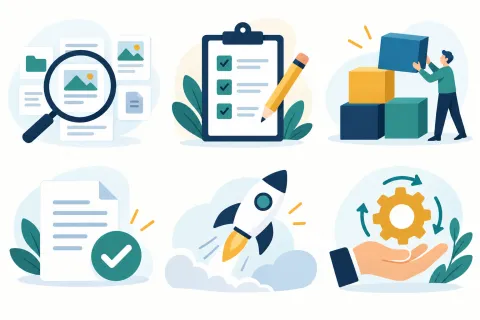
Illustration: discovery, planning, implementation, validation, launch and post-launch support.
- Discovery: Agree the business goals, inventory the existing service and identify critical journeys. Produce a risk list and investigate uncertain dependencies using a safe copy of the site.
- Planning: Approve the keep, improve and retire decisions. Define the destination content structure, responsibilities, budget assumptions and acceptance criteria. Agree how content changes during the project will reach the new site.
- Implementation: Build the Drupal 11 site, rebuild the required presentation and functionality, and configure integrations. Develop repeatable migration steps and test representative content early. Keep a record of manual tasks.
- Validation: Check transferred content, files, relationships, permissions and translations. Test forms, integrations, preserved URLs, redirects, mobile use and accessibility. Ask editors to complete real tasks, and obtain business approval against the agreed criteria.
- Launch: Rehearse the switch. Agree any editing pause, final transfer, backups, responsibilities, communication and rollback conditions. Drupal’s guidance describes incremental migration for new and updated content, but the team must verify what its chosen process handles.
- Post-launch support: Monitor errors, critical journeys and public-site search performance; resolve issues and support editors. Assign ongoing ownership for updates, backups and security monitoring. Review deferred improvements after the service has settled.
Business stakeholder checklist
- Are the business goals, essential journeys and scope agreed?
- Does every content group and integration have an owner?
- Are budget assumptions, dependencies and unresolved risks visible?
- Have staff time, training and acceptance testing been allocated?
- Are legacy URLs, redirect mappings and public-site SEO checks included in acceptance?
- Are launch approval, rollback decisions and ongoing support assigned?
Sources
Official Drupal and Google Search Central guidance checked on 28 October 2026. The project sequence and stakeholder checklist are practical planning recommendations.
The next step
Plan your Drupal migration
Turn your Drupal 7 website into a clear migration plan with AI-assisted delivery and expert human review.